Wen Studio

Wen Studio / Products

iPhone · iPad · Free · TestFlight beta

Miss Sunshine Stickers Table

Turn one image into a print-ready sticker. Upload, edit and export, all on your phone.

Miss Sunshine Stickers Table app icon

Story

It started with a friend who draws

A friend of mine likes to draw. Drawing is his side job.

People keep asking him: could this be a sticker? It could. But every time, he had to go back to the computer: measure the size, trace the white border, draw the cut line, save it in whatever format the printer wanted. Ten minutes to draw a picture. One evening to make it a sticker.

What he wanted was simple. An image on his phone, cut into the shape of a sticker, sent to the printer, or printed at home.

Miss Sunshine Stickers Table was made for that.

The name Miss Sunshine is a wish: to make tedious things simple. Like the sun coming up, with last night's measuring and tracing behind you. Miss Sunshine is the sun girl he draws. Now she is the app icon, and the first sticker.

"I just want my finished drawings to become stickers a little faster."
The first user of this tool.

How it works

Three steps from an image to a sticker

Upload an image

Pick from Photos or Files, or photograph a drawing on paper with the camera.

  • PNG, JPEG and WebP, transparency preserved
  • Camera with focus, flash and full-resolution capture
  • Images are processed on the device and never uploaded

Make it a sticker

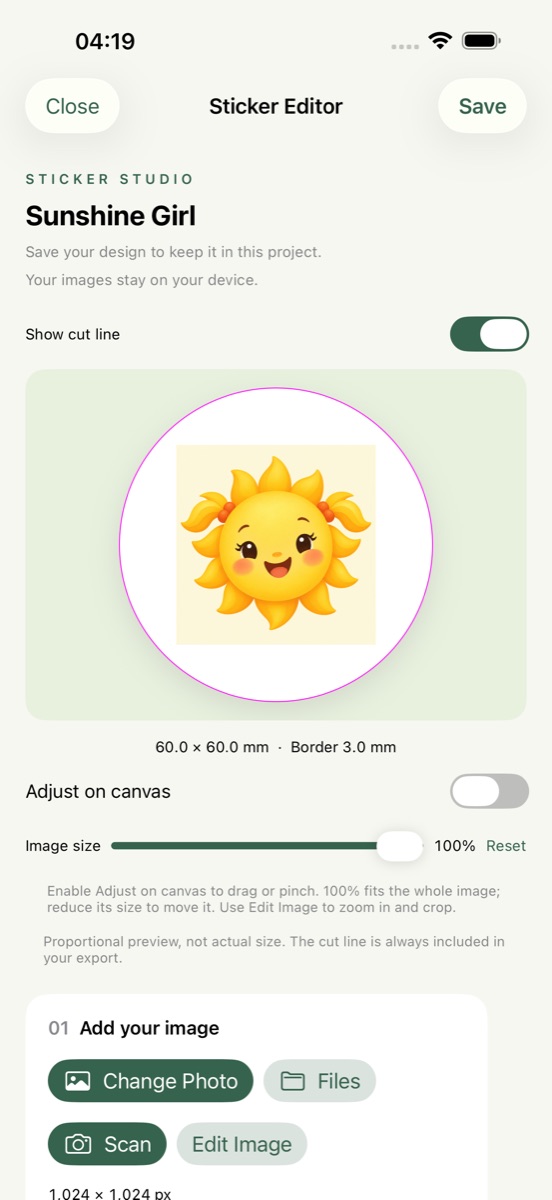
Crop, rotate, correct perspective, remove the background, then choose a shape and set a border in millimetres.

  • Shapes: circle, square, triangle, the outline of the artwork, a business card, and four pop cuts: scallop, daisy, burst and heart
  • Size and border in mm; the sticker width is the finished size
  • Photographed drawings: reduce shadows, straighten the four corners
  • Decorations: nine customizable text styles (bubble, speech bubble, nameplate, price tag, rainbow letters and more), seven parts, six patterns and thick-frame or offset-shadow edges; drag and pinch them right on the preview
  • Business cards: Taiwan 90 × 54 by default, International and US sizes, rounded or square corners, one or two sides, safe area and custom guides, crop marks in the PDF

Export

Export for the purpose: save to Photos, cut files for the printer, or a WhatsApp sticker pack.

  • Export a whole project at once
  • Each file stands alone: no merging, no forced compression
  • A failed export never hands over half a set
Photos PNG1024, 2048 or 4096 px transparent square, shape and border kept.
SVG cut fileEmbeds the original; a separate CutContour layer holds the magenta 0.1 mm vector cut line.
WhatsApp stickersPacks of 3 to 30, 512 × 512 WebP, handed straight to WhatsApp.
Print PDFSpot-colour cut line, bleed, safety-margin preflight, optional printer CMYK ICC.

Screens

On iPhone

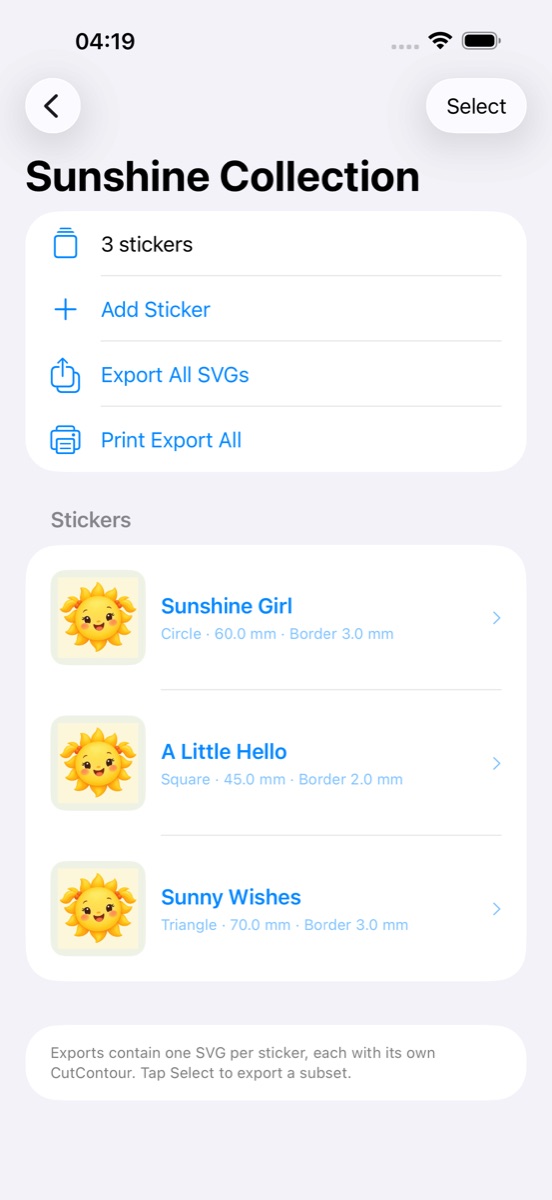
Project screen: sticker thumbnails in the Sunshine Collection
Project: a set of stickers together, exported in one go.
Sticker editor: circular sticker preview showing 60 × 60 mm and a 3 mm border
Editor: shape, millimetre border, cut-line preview.
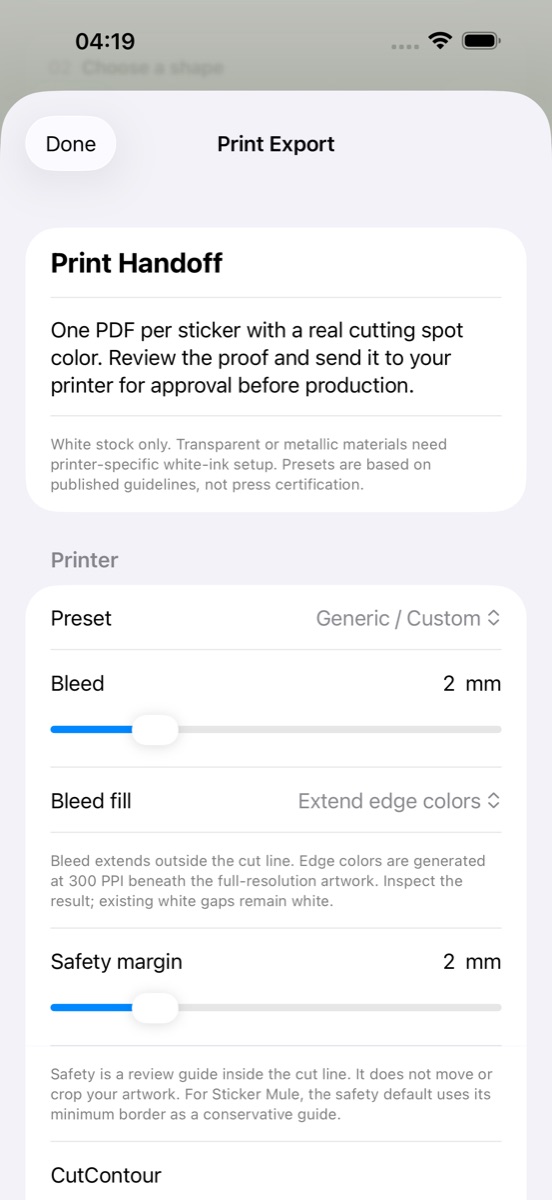
Print settings screen: bleed, safety margin and spot-colour name
Print settings: bleed, safety margin and spot-colour name.

Specifications

Files that work as delivered

DevicesiPhone and iPad, iOS 17 or later. Interface in English and Traditional Chinese.
Sticker shapesCircle, square, equilateral triangle, or the artwork outline (transparent PNGs are traced directly; photos are cut out on the device).
Unitsmm. The border can be 0; the image keeps its aspect ratio and original pixels and is never upscaled.
Cut lineMagenta vector line, 0.1 mm wide, on a separate CutContour layer (SVG) or a spot-colour Separation (PDF).
Print presetsGeneric with 2 mm bleed, plus Sticker Mule and StickerApp presets. Bleed, safety margin and spot-colour name are adjustable. Presets follow published guidelines and are not printer-certified.
WhatsApp stickers3 to 30 per pack, 512 × 512 transparent WebP under 100 KiB each, 96 × 96 PNG tray icon.
PrivacyNo account, no tracking, no ads. Images are processed on the device; the Photos permission is add-only.
PriceFree. No in-app purchases or subscriptions.

Get the app

Currently a TestFlight beta, 1.0 (16). The App Store link goes live after release. To join the beta, email wenstudio.sunshine@gmail.com.